Family calendar
The Family Calendar System That Ends the What's-the-Plan Texts
June 9, 2026/8 min read
Your phone buzzes at 2:14 on a Thursday. It is your partner: "who's getting the kid from practice?" You are in a meeting with your camera off, typing one-handed, and you already answered this on Sunday. Twenty minutes later it buzzes again, this time the group thread, because the carpool mom needs to know if your daughter is coming to the thing on Saturday, and you genuinely cannot remember whether you said yes.
None of those texts are really about pickup or Saturday. They are about the fact that the plan exists in exactly one place, which is your head, and the only way for anyone to read it is to interrupt you. You have become the family help desk. Open from wake-up to lights-out, staffed by one person, no lunch break.
This is fixable, and the fix is not a prettier wall calendar. The fix is to move the plan out of your head into one place every person can read, and then have that place tell each person what they need to know without anyone asking you. Here is how to build that.
Why the texts keep coming
The texts are a symptom of a storage problem. School sends the early-release notice to your email. The soccer schedule lives in a sign-up app nobody opens. Your partner keeps work travel on a calendar you cannot see, and the dentist appointment is on a card on the fridge. Six commitments, six locations, and the only system connecting them is your memory.
When anyone needs an answer, there is only one lookup table to query, and it is you. That is why the load feels endless even on a light week. The work is not the events. The work is being the single point of failure everyone routes through, all day, while you are also doing your actual job.
A real family calendar system fixes the storage problem first. One place holds every person's commitments. Once the plan lives somewhere other than your head, the help-desk role disappears, because there is finally something else to ask.
Build one calendar that holds everyone
The goal is a single weekly view where you can see your whole household at a glance: who is where, who needs a ride, what is non-negotiable, and what can move. You do not need new software to start. You need one calendar that everything feeds into, and a habit of feeding it.
Pick the one place
Choose the calendar your household will actually look at, usually a shared digital calendar your partner and the older kids can open on their own phones. The specific app matters far less than the rule that there is only one of them. The day you maintain two calendars is the day you are back to being the lookup table, reconciling them in your head.
Give every person a color
Color-code by person, not by category. When every event carries the color of the human it belongs to, you can read conflicts in a single glance: two events, same hour, two different kids, one of you. That is the picture you are after. Conflicts you can see on Sunday are conflicts you can solve before they become a Thursday text.
Pull the scattered sources in
Walk the list of places commitments hide and route each one into the calendar. The school portal, the sports app, your partner's work travel, the standing commitments like music lessons and therapy and the every-other-Tuesday late meeting. Put it all in the one place, with the time, the location, and one note about who is responsible. The first pass takes a sitting. After that you are only adding what is new.
Worth knowing
Put the responsible person directly in the event title, not buried in the notes. "Soccer pickup (Dad)" answers the 2:14 text before it gets sent, because the answer is sitting right there on the calendar where anyone can see it. The point of the system is that the calendar speaks, so make it say who owns each thing out loud.
Let one workflow run the calendar for you
The free calendar workflow, The Calendar Cleaner, pulls your scattered schedules into one weekly view, color-coded by person, with conflicts flagged before they reach you. It is the system in this post, set up in one pass.
Open the free workflowThen push the week out to everyone
A shared calendar that people have to remember to check is a help desk with extra steps. The half that actually retires the texts is the part where the week comes to each person, in a form short enough that they cannot claim they did not see it.
Once a week, the calendar gets turned into a plain summary and sent to the people who need it. Your partner gets the two nights they are on for pickup and the one evening you have a late meeting. The sitter gets Tuesday and Thursday with the addresses. The grandparent driving on Saturday gets the time and the field number. Each person receives their slice, not the whole grid, so there is nothing to decode and nothing to ask you about.
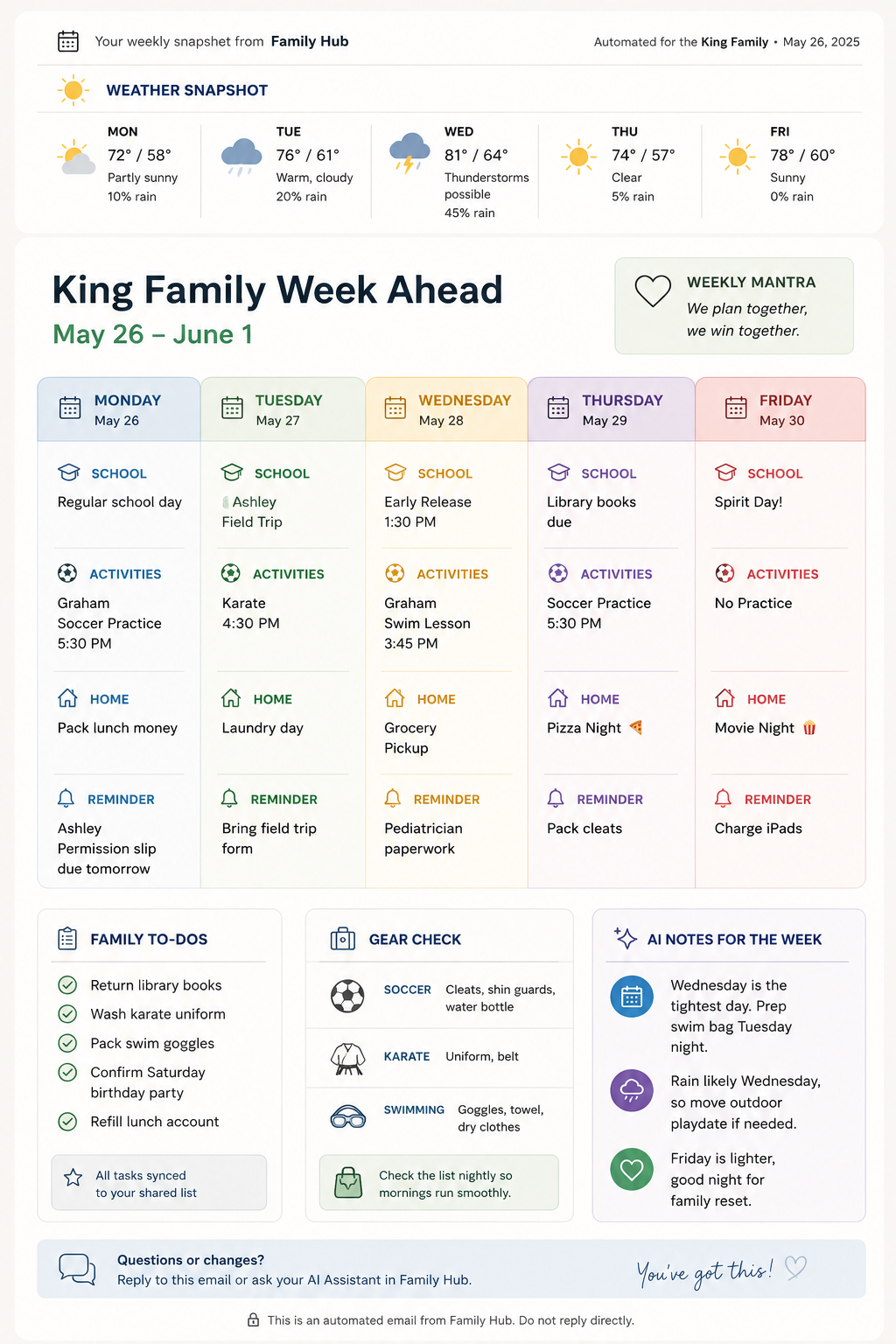
This is the move that ends the texts, and it is worth understanding why. The 2:14 message was never a request for information your partner could not get. It was the path of least resistance: asking you was faster than finding the answer. When the answer arrives in their inbox on Sunday night with their name on it, asking you stops being the easy path. The plan got to them first.
You stop being the family help desk the moment the plan lives somewhere other than your head.
Keep it current without becoming the secretary
The fear, reasonably, is that you have just signed up for a second job: data entry for five people. A few rules keep the calendar honest without that happening.
- Add the moment you know. When the field-trip form comes home or the meeting gets scheduled, it goes on the calendar that minute, not later. "Later" is where commitments go to get forgotten and resurface as a crisis.
- Make the people who own a thing add their own things. Your partner enters their own travel. The teenager enters their own practices and shifts. The calendar belongs to the household, so the household maintains it. You built the system, you are not the one who runs every entry through it.
- Do one weekly look-ahead. Once a week, scan the next seven days for collisions and gaps. This is also when the week gets sent out. Ten minutes here is what prevents the Thursday scramble, because you saw the double-booked Wednesday on Sunday.
- Let the dull parts run themselves. Pulling sources together, spotting conflicts, and writing each person's summary is mechanical work an assistant can carry once it knows your household. That is exactly what the workflow below does.
Hold those four rules and the calendar stays true to your real week, which is the only kind of calendar worth keeping. A calendar that drifts out of date is worse than none, because people stop trusting it and route back through you. Accuracy is the whole asset.
What changes in a week
The first thing you notice is the quiet. The mid-afternoon pickup text does not come, because your partner already has the week and knows they have Thursday. The carpool question gets answered by the calendar the other parent can now see. Your phone stops being the switchboard, and a low background hum you had stopped noticing finally goes silent.
Underneath the quiet is the part that matters more. You are no longer the only person who knows the plan, which means the plan no longer depends on you being reachable. You can be in a meeting, on a flight, or just done for the day, and the household still runs, because the week is written down somewhere everyone can read it.
Get the whole week organized and routed to everyone
The Calendar Cleaner is one of the two free workflows in The Second Shift Method™. It builds the single calendar, flags the conflicts, and sends each person their slice of the week. Members get the full library of workflows that take the rest of the mental load off your plate, too.
Try The Calendar Cleaner